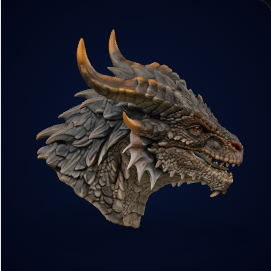
Chunky relief, flat back, strong silhouette, and surface detail that can show the difference between Standard and Pro.
ProP0
lightbulbCustom STL idea hub
3D Printing Model Ideas
Use these ideas when a public STL library does not have the exact object you want. Pick a clear subject, generate a first-pass model in Image3D, then inspect the result in a slicer or Blender before treating it as printable.
30rights-safe concept directions
6categories for custom STL planning
0third-party STL downloads on this page
boltDirect answer
What are good 3D printing model ideas?
Good 3D printing model ideas are simple, recognizable objects with stable shapes: logo badges, chunky creature reliefs, tabletop markers, desk trophies, miniature terrain, toy-like props, and product mockups. Use existing STL libraries when a tested file already exists. Use Image3D when the object is custom, personal, branded, or starts from your own photo, logo, sketch, or prompt.
- Start with one subject, a thick base, and simplified detail.
- Use Standard for quick shape tests and Pro when surface detail matters.
- Inspect every generated STL candidate before printing.
Dragon detail modelUse a detailed object to judge silhouette, surface detail, and print-risk areas before STL export.
Drag to inspect. Auto-rotate stays on.
Best Ideas by Use Case
Choose the idea by the job. The safest first projects have thick geometry, clear silhouettes, and a reason to customize.
| Use case | Try these ideas | Why they fit Image3D | Skip when |
|---|---|---|---|
| Personal gifts | Pet bust, desk trophy, classroom nameplate, team keychain | The value comes from a personal image, name, team, or theme. | You need exact likeness, legal brand use, or finished production quality. |
| Tabletop and games | Stone golem miniature, castle door terrain tile, treasure chest marker, game faction token | Original fantasy objects can be tested quickly before sculpting or cleanup. | You need licensed fan-IP characters or tournament-ready miniatures. |
| Logo and badge workflows | Startup logo badge, event medallion, classroom nameplate | Owned logos and simple icons map well to raised relief models. | The source logo is not yours or the text is too small for printing. |
| Short-video concepts | Dragon head coaster, cute axolotl charm, robot planter, magic lantern prop | These have clear silhouettes and visual hooks for turntable clips. | The shape depends on thin unsupported details. |
| Product visualization | Package display model, retro camera prop shell, device enclosure shell | Image3D can help make first-pass visual mockups. | You need snap fits, tolerances, safety, heat resistance, or a working replacement part. |
30 Custom STL Concept Directions
These are original idea directions for generating your own model candidates. They are not third-party STL downloads, and none should become downloadable packs without rights and print-quality checks.
Rounded body, short legs, and simple gills make it a low-risk beginner object.
StandardP1A small animal detail on a thick bookmark tab. Use it to test eyes and feather relief without fragile limbs.
StandardP2A decorative fish shape with raised fins. Do not imply real hooks or fishing hardware.
ProP2Personalized head-and-shoulders model with simplified fur and a thick pedestal. Use only owned photos.
ProP0Broad shoulders, integrated base, and high silhouette value for tabletop or DND-style concepts.
ProP0Robe shape and staff merged to the body to avoid unsupported thin parts.
ProP1Flat-backed door, bricks, arch, and base thickness for tabletop terrain testing.
StandardP0Clean hard-surface prompt with low overhang risk for games and tabletop props.
StandardP1Box form with raised straps and lock detail. Good for comparing texture and edge detail.
ProP1Owned logo relief test with thick strokes, clean edges, and a flat back.
StandardP0Raised initials and a thick loop. Use only owned team marks or original icons.
StandardP1Round token with date, icon, and edge rim. Text readability is the main test.
StandardP2Large letters and a simple symbol for teacher, parent, or classroom craft searches.
StandardP1Original symbol only. Avoid fan-IP copying and franchise-coded shapes.
StandardP2Curved prop shape with thick rim and stand integration for Blender cleanup demos.
ProP1Decorative handle with blunt geometry. Keep the language original, not franchise-specific.
ProP2Boxy product form with a lens ring. Treat it as a visual prop, not functional hardware.
StandardP2Thick frame, large window shapes, and a printable base for fantasy prop clips.
ProP1A simple support stand for generated badges. Keep it visual until measured in CAD.
StandardP2Rounded toy shape with an open top as a concept. Do not claim watertight output.
ProP1Useful-looking idea, but exact grip and tolerances still belong in CAD.
StandardP2Thick base and wall-contact face. Treat it as a concept until strength is tested.
ProP2Visual ideation for a themed stand. Real support angle and thickness need CAD checks.
StandardP2Custom initials, big shape, and low-detail surfaces for fast social proof clips.
StandardP1Visual reference only. Exact fit, shaft, heat, and safety belong in CAD.
StandardP3Useful for pitch visuals, not snap fits, screw bosses, or production tolerances.
StandardP3Small custom charm idea with loop-thickness and brand-rights warnings.
StandardP2Decorative wheel face. Avoid claiming it replaces functional mechanical geometry.
StandardP3Product-photo-to-3D style mockup for storefront visuals and early concept tests.
ProP1How to Choose an Idea
Do not start with the most complex object. Start with the idea that has the clearest shape and the lowest printability risk.
1. Pick a clear silhouette
Choose an object that reads instantly: badge, token, creature head, simple prop, or display object. Avoid many thin accessories in the first attempt.
2. Add print-aware constraints
Ask for a thick base, simplified limbs, merged accessories, and one main subject. This gives the model a better chance of surviving slicer review.
3. Inspect before export
Use browser preview first, then Blender or a slicer for scale, islands, overhangs, and mesh issues. Treat the result as a candidate until checked.
Important: This page does not sell or redistribute STL files. It is a safe idea hub for custom generation workflows. Downloads and paid packs require source rights, model license, print-test status, and support rules first.
When to Use Image3D
Image3D fits the custom part of the 3D printing workflow. It should complement STL libraries, not pretend every generated mesh is a finished engineering part.
| Use Image3D when | Use a library when | Use CAD or Blender when |
|---|---|---|
| You have a personal image, logo, sketch, or prompt. | A proven printable file already exists on a reputable STL library. | The part needs exact dimensions, tolerances, or measured assembly. |
| You want a first-pass decorative object or concept model. | You need known print settings, remixes, or community-tested results. | The output needs cleanup, retopology, repair, or material organization. |
| You want to test an original idea before paying for manual modeling. | You need commercial license clarity from a marketplace creator. | You need strength, snap fits, heat handling, threads, or load-bearing behavior. |
Frequently Asked Questions
These answers set expectations for AI-generated STL workflows and future case pages.
What are good 3D printing model ideas for beginners?
Good beginner ideas are simple objects with a stable base, thick parts, and one clear subject, such as logo badges, desk trophies, tabletop markers, chunky creature reliefs, and simple props.
Can Image3D turn these ideas into STL files?
Image3D can generate first-pass 3D model candidates from images or prompts and can route suitable results toward STL export workflows. Generated files should still be inspected in a slicer before printing.
Are these downloadable STL files?
No. This page is an idea and workflow hub. It does not redistribute third-party STL files or claim that the listed ideas are downloadable model packs.
Which ideas are best for custom generation instead of STL libraries?
Custom generation fits personal or branded objects, pet busts, original props, logo reliefs, custom tabletop tokens, and product mockups that are unlikely to exist in a public STL library.
What should I check before printing an AI-generated STL?
Check scale, base stability, thin details, overhangs, unsupported islands, non-manifold mesh issues, and whether the object needs Blender or slicer cleanup before printing.
Can I sell prints from these model ideas?
Only use images, logos, prompts, and model files that you own or have permission to use. Commercial selling needs rights confirmation, source tracking, and print-quality expectations before it is offered as a product.
Turn one idea into a first-pass model.
Pick a simple object, use an owned image or prompt, generate a preview, then check whether it deserves STL export and slicer inspection.