Image3D API beta

Image to 3D API for GLB model generation

Generate 3D model tasks from product photos, concept images, or text prompts. The Image3D API beta is built for controlled API keys, prepaid credits, task polling, and generated GLB output that developers can review before embedding in an app or workflow.

Can developers generate 3D models with the Image3D API?

Yes. Signed-in users can create an Image3D API key after adding prepaid API credits, submit image-to-3D or text-to-3D jobs, poll task status, and receive a generated GLB model URL when the job completes. API usage is credit-capped and metered so higher-cost jobs do not run without prepaid allowance.

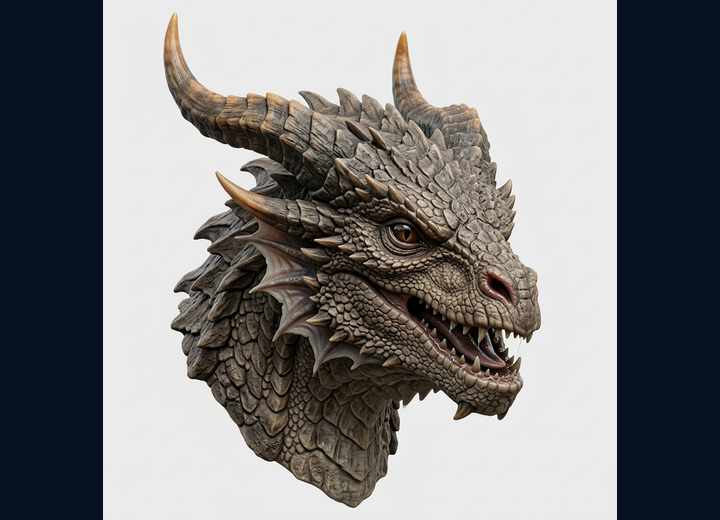
Input dragon concept for an image-to-3D API workflow
Input image
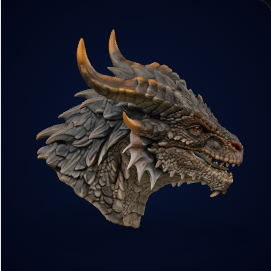
Generated dragon GLB preview from Image3D
Generated GLB
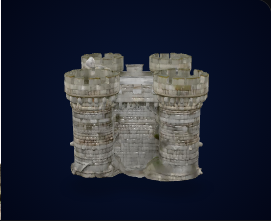
Generated castle GLB preview from Image3D
Store or app preview
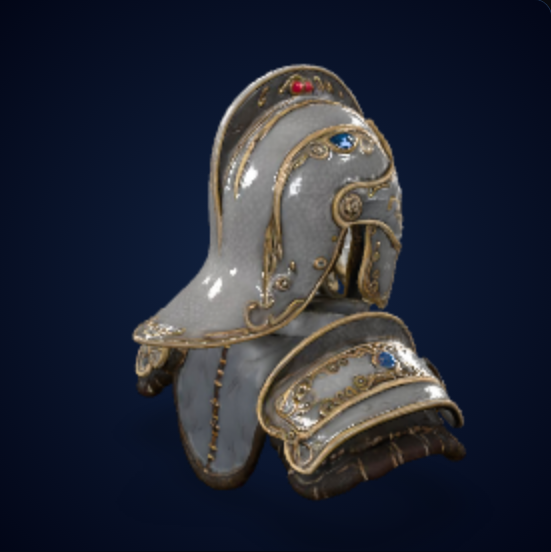
Generated helmet 3D model preview from Image3D
Review before use

Best fit and not a fit

Best for

Automated 3D drafts that still need review

Use the API for automated product previews, user-generated 3D drafts, game asset prototypes, ecommerce review tools, and internal creative systems where a generated GLB candidate is useful even before manual cleanup.

Not a fit

Exact engineering or unattended manufacturing

Do not use an image-to-3D API as a guaranteed CAD reconstruction system. Exact tolerances, watertight print repairs, rigging, production topology, and safety-critical geometry still need specialist tools or human review.

How the API workflow works

1

Create a key

Sign in, add prepaid API credits, and create a live API key from the API console. Self-serve keys start with conservative daily, monthly, and concurrency caps.

2

Submit a generation

Send an image or text prompt to the generation endpoint. The task is precharged before the model job starts, which prevents unpaid or runaway API usage.

3

Poll and inspect

Poll the task until it succeeds or fails. Completed tasks return a GLB model URL and billing fields; failed jobs can refund unused precharge.

API billing model

Image3D uses credits because developers need predictable prepaid limits, while image-to-3D generation can have variable cost. The public rule is simple: add credits first, run jobs within caps, and inspect the task ledger after settlement.

Billing conceptCurrent beta ruleWhy it matters
Credit rate$1 = 100 credits. One credit equals $0.01 of prepaid API usage.Developers can read API usage as both credits and dollars.
Minimum startAdd at least 1,000 credits before creating a self-serve API key.API calls require real prepaid balance instead of free-trial-only usage.
Standard image jobsPrecharged before running and settled dynamically after completion.Variable-cost jobs are capped instead of creating unlimited cost exposure.
Failed jobsFailed generation tasks can refund the precharged credits automatically.Developers are not charged for upstream failures when the job does not complete.
Usage ledgerRecent tasks show task ID, request, input, output, precharge, final charge, refund, and provider cost when available.Teams can audit every task instead of guessing where credits went.

Example request shape

POST /api/v1/generationsBearer API key
{
  "mode": "image",
  "quality": "standard",
  "image_url": "https://example.com/product-photo.png",
  "output_format": "glb",
  "metadata": {
    "source": "store-product-preview",
    "sku": "demo-001"
  }
}

Use the returned task ID to poll status. When the task completes, the response includes a generated model URL and settlement fields for API billing.

When to choose Image3D API instead of a model library

NeedBetter choiceReason
A tested, already printable STL for a common objectUse a model library firstA library model may already include print notes, slicer settings, or community proof.
A custom product preview, branded object, or user imageUse Image3D APIThe object does not already exist as a reusable public model, so generation is useful.
Exact CAD dimensions or mechanical fitUse CAD or engineering toolsAI reconstruction from a single image is not a tolerance workflow.
High-volume app integration with variable user inputsUse Image3D API with prepaid capsThe task ledger and credit limits help keep usage controlled.
Cost-control rule: do not run unlimited Standard image jobs from untrusted users without prepaid balance, daily caps, and task-level settlement. The API should make money from the first prepaid call, not wait for a subscription conversion later.

Frequently Asked Questions

Can developers generate 3D models with the Image3D API?

Yes. Signed-in Image3D users can create an API key after adding prepaid API credits, submit image-to-3D or text-to-3D jobs, poll task status, and receive a GLB model URL when the job completes.

Does the API return STL files?

The API beta is centered on generated GLB model output. STL workflows should use the web tool or a downstream conversion and slicer inspection process before treating a model as printable.

How is Image3D API usage billed?

API usage is prepaid. The account must have enough API balance before calls run. Jobs are precharged, completed jobs settle to a final charge, and failed jobs can be refunded automatically.

Is the Standard model safe for API usage?

Standard image jobs can have variable processing cost, so Image3D uses precharge, credit caps, and dynamic settlement to avoid unlimited usage and to keep higher-cost jobs from running without prepaid allowance.

What is the Image3D API best for?

It is best for automated product previews, user-generated 3D drafts, game asset prototypes, internal creative tools, and workflows that need a generated GLB candidate for review.

What is the Image3D API not a fit for?

It is not a fit for guaranteed CAD reconstruction, exact engineering tolerances, rigging, print-ready repairs, or unattended manufacturing output without human review.